For people who don’t understand UK Brexit, imho It’s all just about benefitting from a once in a lifetime realignment of how a nation is structured. Which explains the blinkers in use by some people in power. It isn’t going to result in a fairer society.
Sander van Dragt's Notes
-
-
How to install the NVIDIA drivers on Ubuntu 18.04
How to install the NVIDIA drivers on Ubuntu 18.04
sudo ubuntu-drivers autoinstallIf this fails because of a dependency that won't be installed, use apt for both the driver and the dependencies. #ubuntu #linux
-
The Ethics of Web Performance
Sites that use an excess of resources, whether on the network or on the device, don’t just cause slow experiences, but can leave entire groups of people out.
Site performance is an accessibility issue.
-
WPWeekly Episode 361 – Introduction to the IndieWeb With David Shanske – WordPress Tavern
WPWeekly Episode 361 – Introduction to the IndieWeb With David Shanske – WordPress Tavern
Look forward to listening to this. Both the indyweb and WP are dear to my heart.
-
PHPStorm font rendering on OpenSUSE
On Ubuntu LTS the font rendering on #PHPStorm 2019.1 looked great by default, but on #OpenSuse Tumbleweed I needed to tweak the settings a little to get the editor to look good. There is conflicting information out there for out of date versions of OpenSUSE and PHPStorm and it took a bit of research to figure out what works for me.
Under Help | Edit Custom VM Options... I added the following lines:
-Dswing.aatext=true<br></br>-Dawt.useSystemAAFontSettings=onI also set antialiasing (within the main PHPStorm Settings | Appearance menu) to greyscale.
Finally, I added the Dreamweaver CC colour scheme to the editor by saving the xml file in
~/.PhpStorm2019.1/config/colors/.Restart the application and select the color scheme from File | Settings | Editor | Color Scheme
Sources: sheelahb.com
-
I’ve switched all my personal #wordpress experiments to Chassis this morning. I like the concept of plugins on a local dev setup. https://docs.chassis.io/en/latest/
-
Sometimes I do research for a browser tab and want to go back to the last used tab when I close the research topic. Other times I want to review all open tabs and cycle through them without switching back to the last used one every time. I'm ctrl-tabbing to make all tabs active but a separate keyboard shortcut would be great #firefox
-
WorkLog 2.2
WorkLog.py is a very simple script that allows you to keep track of what you are working on by writing a timestamped message to a CSV file. It turns out it helps me stay on track during a long day of work.
Version 2.2 has some new quality of life improvements:
v2.2:
* ctrl-d or enter to quit. * works on python2 default systems. * f-strings, * code more elegant. * day based csv files.
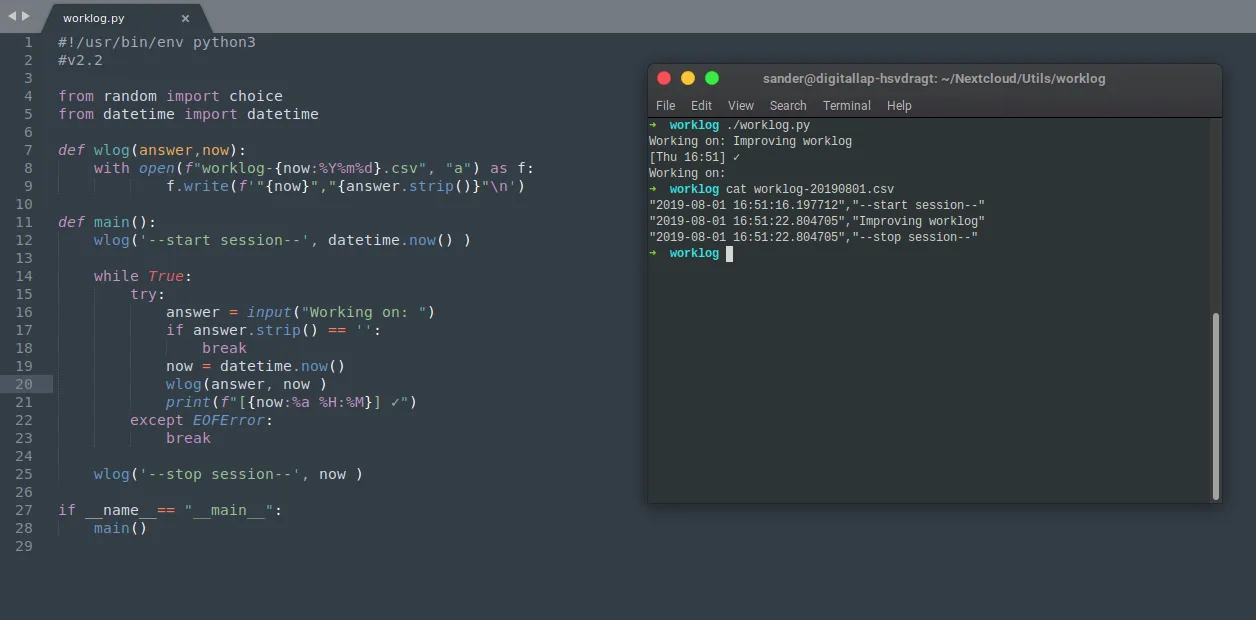
https://gist.github.com/svandragt/080843c4ba632deaab6f3aea57ca9684
-
openSUSE System Upgrade Guide
-
Fixing Virtualbox host network adapter cannot be created error
If when trying to start a vm, for example using vagrant, you get the error message that the host network adapter cannot be created:
There was an error while executing `VBoxManage`, a CLI used by Vagrant<br></br>for controlling VirtualBox. The command and stderr is shown below.<br></br><br></br>Command: ["hostonlyif", "create"]<br></br><br></br>Stderr: 0%...<br></br>Progress state: NS_ERROR_FAILURE<br></br>VBoxManage: error: Failed to create the host-only adapter<br></br>VBoxManage: error: VBoxNetAdpCtl: Error while adding new interface: failed to open /dev/vboxnetctl: No such file or directory<br></br>VBoxManage: error: Details: code NS_ERROR_FAILURE (0x80004005), component HostNetworkInterfaceWrap, interface IHostNetworkInterface<br></br>VBoxManage: error: Context: "RTEXITCODE handleCreate(HandlerArg*)" at line 94 of file VBoxManageHostonly.cppMake sure to first start the virtualbox GUI application. It does some extra checks, and sometimes highlights the permission problem:
In my case (OpenSuse 15.1 Leap), my user was not added to the vboxusers group. Via Yast > Users and Security .... and editing my user account it was a simple checkbox away. Remember to relog.
If that doesn't work, reloading the kernel extensions could help:
$ sudo dpkg-reconfigure virtualbox-dkms$ sudo dpkg-reconfigure virtualbox<br></br>$ sudo modprobe vboxdrv <br></br>$ sudo modprobe vboxnetadp#opensuse #virtualbox #linux #vagrant